












html converter wizard box

Screens

Video

Guide

HTML Converter Wizard

A reliable & powerful solution to convert HTML files into 8+ formats offline. Trusted by 1,700+ professionals worldwide for secure and fast conversion while keeping all important data intact.

  • Converts HTML files into clean and readable text format.
  • It offers user's preferred language to convert HTML files..
  • This software offers 7+ output formats to convert HTML files..
  • It preserves HTML layout structure, metadata, images, and formatting.
  • Support batch conversion of multiple HTML files while keeping data secured.

Why Choose HTML Converter?

Learn why converting Chat HTML files is important for secure access and reliable data management.

Features BitRecover HTML Converter Other Converter Tool
Batch File Conversion Compatibility
Check

Supports bulk HTML file conversion

Cross

Limited single-file conversion

Output Formats Support
Check

Provides up to 8 formats

Cross

Limited Formats

Data Security
Check

No cloud upload

Cross

Data uploaded to other servers

Formatting Preservation
Check

Preserves metadata, images, structure, and layout

Cross

Formatting can change

Offline Utility
Check

Works without an internet connection

Cross

Many software need an internet connection

Folder Structure Support
Check

Keeps original folder hierarchy

Cross

The folder structure can be lost

Target Userss
Check

For IT professionals, or enterprises, etc.

Cross

For Casual users and basic conversion.

8 formats

Converts HTML file into 8 Formats

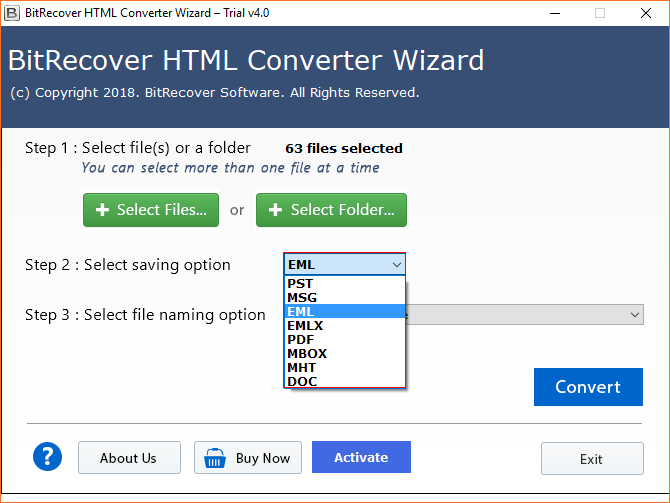
BitRecover HTML Converter supports 8+ popular formats, such as PDF, DOC, PST, EML, MSG, MBOX, EMLX, and MHT. It helps users to access HTML data in many different formats without compatibility issues.

unified email migration experience

Unified Email Migration Experience

It convert HTML files into widely compatible formats to use the data safely for smooth migration to multiple email platforms, archiving & backup, or open them in across multiple devices. This HTML Converter preserves the original content, formatting, structure, and embedded elements. While converting the HTML files it ensures accurate and reliable results.

Feature Highlights of HTML Converter

Powerful Options to Meet Personal, Professional, and Business Conversion Needs.

batch conversion

Supports Batch HTML Conversion

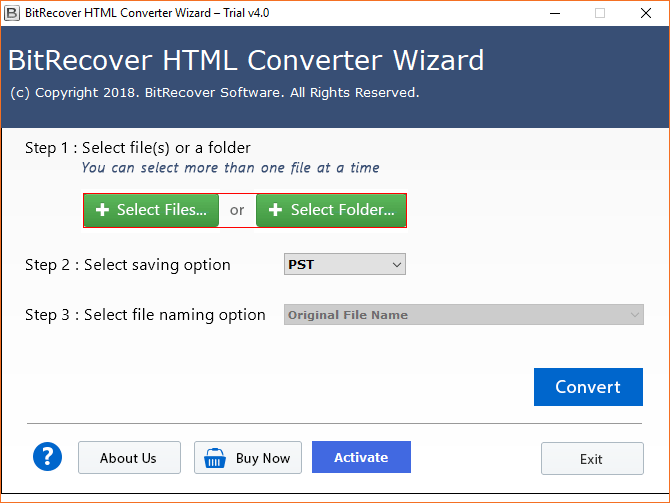
User can choose bulk conversion of several HTML documents with the help of this HTML file converter without any data loss. The tool provides dual methods for a user to choose single or batch HTML conversion. To enable batch migration, choose Select Files and Select Folder option from the toolkit panel and load all HTML files at once.

multiple output formats

Export HTML to Multiple Formats

With the help of BitRecover HTML file Converter one can save HTML files to PDF, HTML to PST, HTML to MSG, HTML to EML, HTML to EMLX, HTML to MBOX, HTML to MHT and HTML to DOC formats. Now open HTML documents on various portable devices like mobiles, tablets also.

dual options

Dual Options for Inserting HTML

HTML exporter software offers dual options to load .html files in software panel like Select Files which is helpful to select .html files while Select Folder option allows to choose folder which has multiple .html files. With the help of these options, users can easily choose .html files for migration.

file naming options

Many File Naming Options

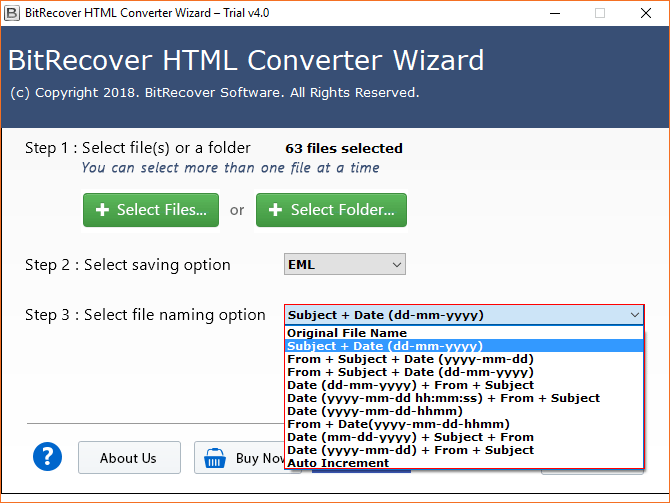
HTML file converter offers multiple file naming options to convert HTML files into single email and documents formats without facing any error issue. The users can manage the resultant data by date, subject, from, auto increment, original file name, etc.

specified location

Save Files at Specified Location

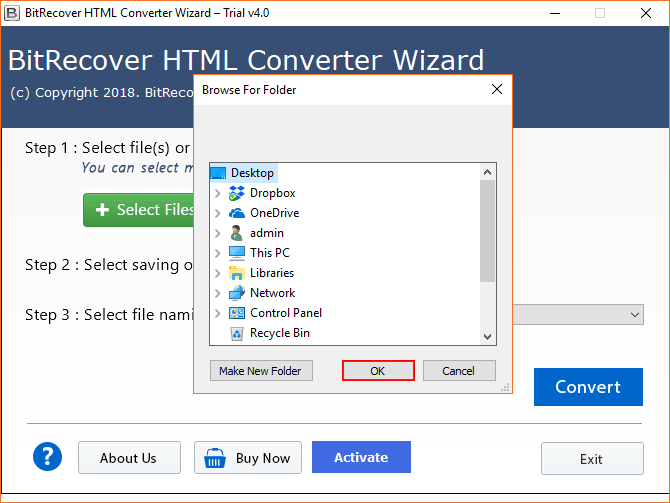
The main advantage while using this utility is its rich adaptability with user experience. The user can select the destination location to save the resultant files after conversion of HTML file. It is necessary to select the destination path to export resultant data, the tool also allows to save converted emails into external storage devices.

safe and secure

100% Secure to Export HTML Files

For user’s sake of reliability, this HTML Converter proves to be the most secured, easiest, fastest, and powerful wizard. The resultant files are completely free from any Virus, Malware or any infection. User can perform the HTML email conversion Offline without requiring Internet connection.

free demo version

Evaluate Free HTML Converter Demo

The user can captivate the tool by using its free trial version. The trial version offers some limitation related to the number of the HTML files for conversion. User can convert only first 25 HTML files to PST, MSG, EML, EMLX, PDF, MBOX, MHT, DOC formats using free trial version of HTML File Converter.

multiple languages

Multiple Setup Languages

HTML exporter offers different setup languages to install the product on PC so users can choose any language from English, Deutsch, Francais, Italiano, Nederlands, etc. to install the product. This option is helpful to use the product in different languages according to user’s choice.

How to convert HTML Files?

Follow the mentioned steps to easily convert HTML files into any available file format:

  1. Launch BitRecover HTML Converter Wizard on pc.
  2. Insert *.html documents in the software GUI.
  3. Select saving format from available list.
  4. Browse destination path to store output data.
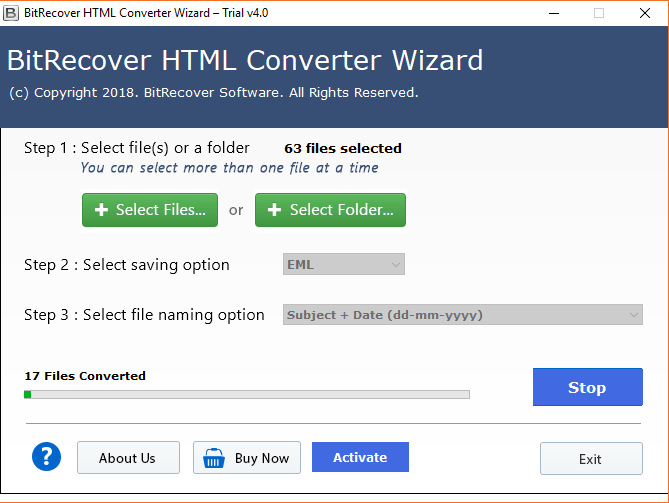
  5. Press Convert button to start HTML conversion.
html conversion
free html converter free demo version

Try the HTML Converter Wizard for Free

BitRecover HTML converter offers a free trial session, which allows users to test the software interface before purchasing. With the help of a demo session, users can understand the performance, review features, and examine how the conversion process works on the user's system.

Who Requires a Professional HTML Conversion Tool?

Don’t Forget to Convert HTML File If Your Are One of These

business professionals

Business Professionals

Users from businesses mostly use the HTML converter to receive reports, invoices, and web-based documents in HTML format. However, the HTML files are not always easy to print or share. An HTML Converter can help them to convert HTML files into formats like DOC or PDF, which they can easily store, share, and edit. Business users can access the documents without a web browser.

students and educators

Students and Educators

Many times students gather information from websites. Converting the HTML files into PDF or document formats, they can make offline copies of important materials to study, print, and share. Educators can also use the converted file to distribute learning resources to students in a more proper format.

web developers

Web Developers

Web developers need to save the web pages. An HTML Converter can help them by converting website content into formats such as DOC and PDF for offline storage and documentation. It is recommend for preserving website content for future reference or maintaining project records.

it administrators and email users

IT Administrators and Email Users

Many organizations depends on HTML-based emails for communication, notifications, and marketing campaigns. It lets users to convert HTML files into email-compatible formats, for example, PST, EML, MSG, and MBOX. It makes the process easier to import data into email clients like Microsoft Outlook, Thunderbird, and Apple Mail. IT admins can also use it for email migration, backup creation, and long-term data preservation.

Technical Requirements for HTML Converter

Know the Minimum System Specifications to Use This Software

Software Download

File Size: 15.8 MB

Version: 4.5

Trial Limitations

The free demo version of the HTML Converter allows to convert first 25 HTML files into any available formats.

System Specifications

Hard Disk Space
50 MB of free hard disk space

RAM
Minimum 4 GB RAM

Processor
Intel® Pentium 2.4 GHz processor

Supported Editions

Microsoft Windows – Windows OS 11 (64 bit), 10, 8, 7 (32 bit or 64 bit) & Windows Server 2025, 2022, 2019, 2016, 2012 R2, 2008, etc.

Electronic Delivery

BitRecover HTML Converter Wizard will be delivered automatically. After your payment is confirmed, you will receive an email with a link to download the product and the activation key.

Trial vs Full Version Comparison

Brief Difference Between the Demo and Licensed HTML Converter

  •  
  • Upload multiple HTML files
  • File explorer view
  • 8 commonly used saving options
  • Preserves data integrity
  • File naming options
  • 24x7 Customer Support
  • Unlimited files Cost
  • Most Popular
    Pro
  • All file conversion
  •  Buy
BitRecover HTML Converter Wizard: A Recognized Solution

Your Trusted Partner for Seamless and Bulk Conversion of HTML files.recognition and awards

microsoft marketplace

Microsoft Marketplace

Our HTML File Converter has been acknowledged by Microsoft’s trusted app marketplace. It highlights our tool's quality, security, and enterprise-level reliability.

software suggest

Software Suggest

Software Suggest has honoured our HTML converter with the "Satisfaction Superstar" and "High Performer". It reflects our dedication to enhance user experience.

software informer

SoftwareInformer

Our HTML file Conversation Converter has also earned 5/5 stars for the outstanding performance and software's excellence as assessed through a comprehensive evaluation process.

free download manager

Free Download Manager

BitRecover HTML File Converter has also recognized as a top-tier and virus-free solution by Free Download Manager. This highlights the data safety, accuracy, and reliability factors of the tool.

Have Questions? Get Answers!

Know What Users Ask About HTML Converter Software

Yes, anyone can convert HTML to PDF for free. BitRecover HTML Converter offers users to convert 25 HTML files to any supported format.

Yes, this tool can easily convert HTML to Word, you have to simply install HTML Converter, choose HTML file or folder from given option, select DOC from select saving option and then click convert button to start the conversion process of HTML file.

Yes, the HTML Converter tool keeps the originality content intact like metadata, images, structure, layout, and formatting of content during the file conversion process.

It is a standalone software, it doesn’t require Outlook or any other third-party applications to install to perform the file converting task.

Yes, the software is preferable over other Online HTML Converter tools as user can now convert HTML files to multiple formats without requiring internet connection.

What Do Customers Say?

Read Client Reviews After Using HTML Converter Software Full Version